Development and testing
Create files for testing and troubleshooting
Replace real names and contact details in an existing file to prepare a copy for software testing or bug investigation.

Pelrivo
CSV, TSV, JSON, and XML
Replace names, email addresses, and other personal details to prepare files for sharing or testing. Choose the fields to change, preview a sample, and save a separate copy.
File processing takes place on your PC. No cloud upload is required.
Coming soon. Pelrivo isn't available to try or buy yet.
Planned price
$24.99USD · One-time purchase
Applicable taxes are shown at checkout.
7-day free trial at launchWindows 11 (x64 / ARM64)
Examples
Start with an existing file and choose which personal details to replace.
Development and testing
Replace real names and contact details in an existing file to prepare a copy for software testing or bug investigation.
Sharing at work
Keep the amounts and customer categories your recipient needs, and replace names or contact details that aren't needed.
In the app
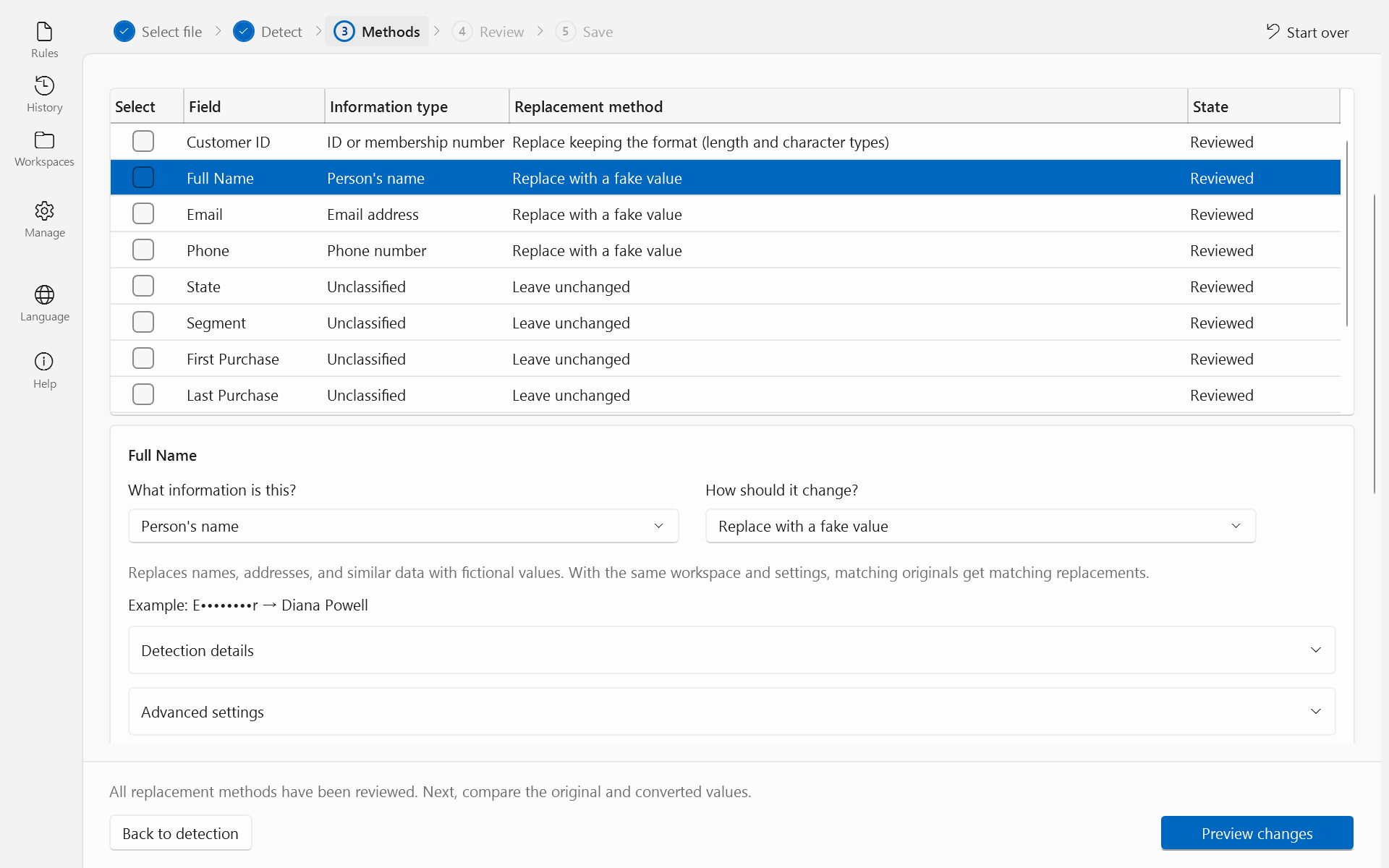
Select a field, such as a name or email address, and choose how to replace its values. No coding is required.
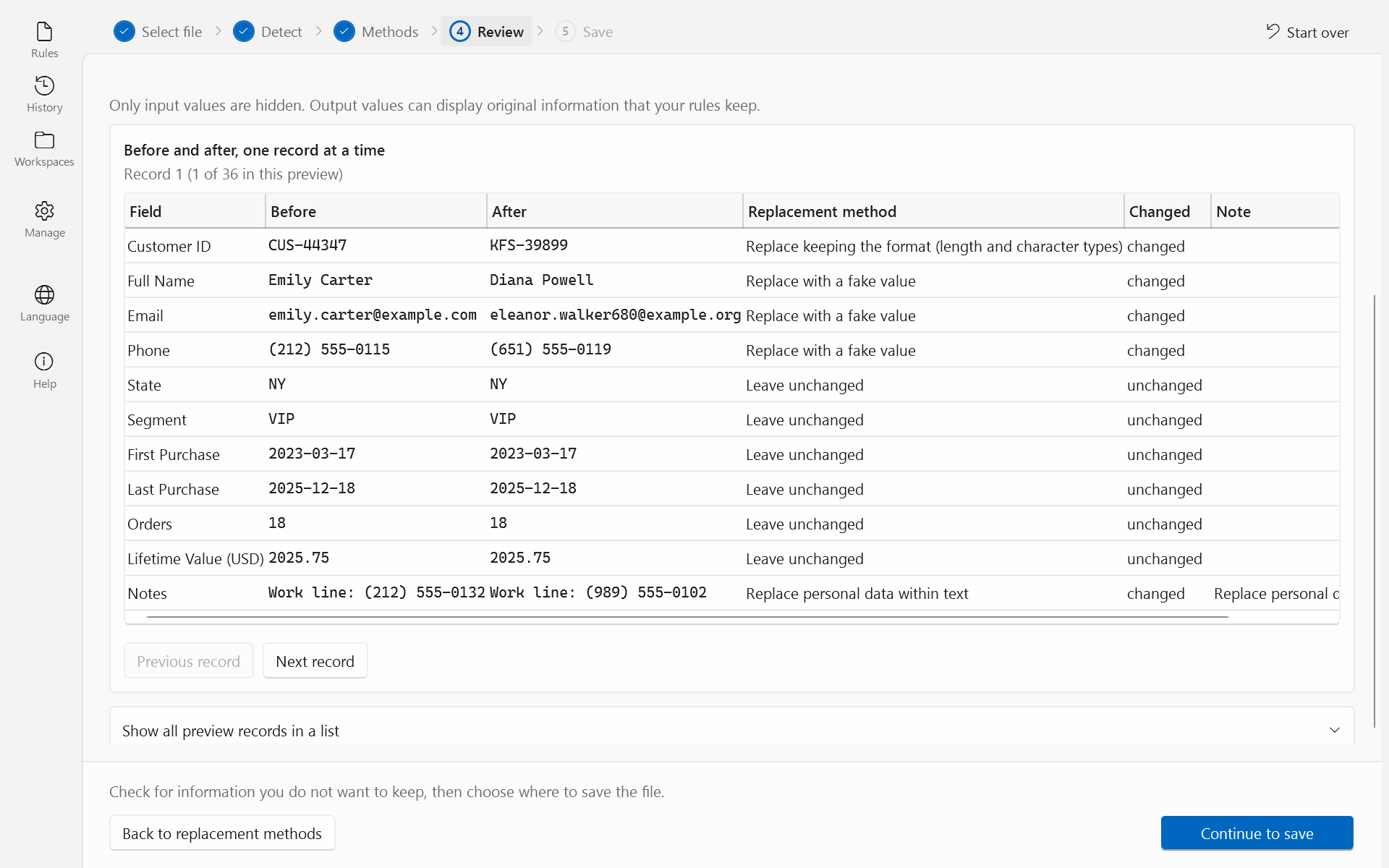
Preview a sample of the changes before saving the result as a separate file.
Check your PC and file formats before installing Pelrivo.
Pelrivo doesn't edit PDFs, Word documents, or images, and doesn't connect directly to databases or BI tools.
Full requirements and sales termsPelrivo processes files on your PC. You don't need to upload them to a cloud service.
Your original file is not overwritten. Pelrivo saves the result as a separate file.
Installing or updating the app, checking your Microsoft Store license, and setting up optional AI features may require an internet connection.
App privacy policyPlanned price
$24.99USD
Applicable taxes are shown at checkout.
One-time purchase
No monthly or annual subscription.
Pelrivo will be available to try and buy through Microsoft Store.
Coming soon. Pelrivo isn't available to try or buy yet.
The trial will include the same features as the paid version, so you can try opening, processing, previewing, and saving your own files.
When the trial ends, you'll need to buy Pelrivo to keep using it. Pelrivo does not delete your original files or the files you've saved when the trial expires.
Yes. You can use Pelrivo for work. Follow your organization's software and data handling policies, and review the terms of use and sales terms.
You can reinstall Pelrivo on a new PC as permitted by your Microsoft Store license. The terms of use and sales terms explain the applicable conditions.
No. You can open, process, preview, and save files without an AI subscription or setup. The optional AI assistance lets you review and accept suggested processing methods for each field. It requires separate setup.
It can. Replacing values may affect calculations or analysis. Check record counts and totals in your analysis tool. Pelrivo prepares files; it doesn't analyze data or create charts.
Contact the developer for help using Pelrivo or to report bugs or anything that doesn't work as described. Microsoft handles Store orders, payments, and refund requests. The support page explains how to contact each.
Contact the developer, kkdev92, with product questions in English or Japanese, before or after purchase.
Describe your task and file format. Please don't send customer data or confidential information.